
Rocket
Just Now
41MB
3.1.7
Android & iOS
9K
Description
Rocket APK is the Android application for Rocket, a mobile financial service operated by Dutch-Bangla Bank PLC in Bangladesh. It helps users manage everyday financial activities, including sending money, adding funds, withdrawing cash, recharging mobile phones, paying bills, and making payments to participating merchants.
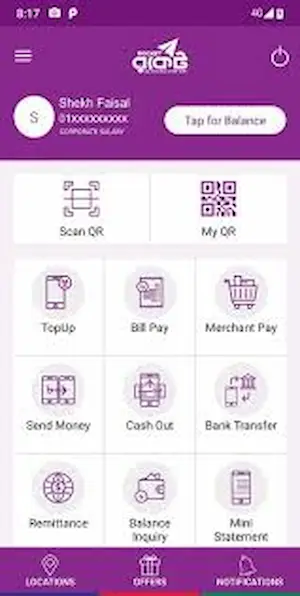
The official Android app is available through Google Play. It also provides account registration, balance inquiries, transaction statements, and selected fund transfer options connected with Dutch-Bangla Bank accounts and debit cards. Users can access supported services in Bangla or English, making the platform convenient for a wide range of customers.
In this guide, you will learn how to download the app, create an account, log in, transfer money, withdraw cash, check fees, and protect your financial information. Also visit Microjobsbd apk, it is online jobs platform for Bengali Uers.
What Is Rocket Mobile Banking?
Rocket is a mobile financial service provided by Dutch-Bangla Bank PLC. It allows eligible customers in Bangladesh to perform supported financial transactions using a mobile phone instead of visiting a bank branch for every routine payment.
The service is designed for people who need a convenient way to receive funds, send money to family members, pay participating merchants, and manage everyday expenses. Its Android application combines several services in one interface, while supported USSD services provide an additional access channel.
Customers can use the platform for personal transfers, mobile top-ups, eligible bill payments, and cash transactions through authorized service points. Certain banking transfers are also available for eligible accounts.
The exact services, limits, and requirements depend on the user’s account type and the bank’s current rules.
Rocket App Information
| Detail | Information |
|---|---|
| Application name | Rocket |
| Developer | Dutch-Bangla Bank PLC |
| Category | Finance |
| Country | Bangladesh |
| Supported platform | Android |
| Currency | Bangladeshi Taka (BDT) |
| Languages | Bangla and English |
| Main services | Transfers, cash in, cash out, recharge, bill payments |
| Official download source | Google Play |
| USSD code | *322# |
| Download cost | Free to download |
| Internet requirement | Required for internet-based app features |
The application listing identifies Dutch-Bangla Bank as its developer and describes features such as account registration, cash transactions, bill payments, merchant payments, and account inquiries. Some services may require additional verification or an eligible linked bank account.
Main Features of the Rocket App
1. Money Transfers
Users can transfer funds to eligible Rocket accounts for personal payments and family support. The app provides a transaction flow in which customers enter the recipient’s details, specify an amount, and review the information before authorizing the transfer.
Eligible users can also access certain transfer options involving Dutch-Bangla Bank accounts or debit cards.
2. Cash In
Cash in allows customers to add money to their mobile financial accounts through authorized agents or other supported channels. After completing a deposit, users should check their account balance and transaction confirmation.
The availability of additional funding methods depends on the options currently offered to the account holder.
3. Cash Out
Customers can withdraw funds through authorized Rocket agents and supported Dutch-Bangla Bank withdrawal channels. The process generally requires transaction verification and customer authorization.
Before withdrawing money, check the applicable fee and ensure that the amount falls within the permitted transaction limits.
4. Mobile Recharge
The application supports mobile top-ups for eligible mobile numbers. Users can choose the available recharge option, enter the number, select an amount, and review the details before confirming the payment.
Always verify the phone number before completing a recharge.
5. Utility Bill Payments
Rocket provides bill payment options for participating providers. Depending on the services available to the account, customers may be able to pay eligible household or institutional bills directly through the application.
Check the biller name, account reference, and payable amount before authorizing a transaction.
6. Merchant Payments
Customers can use supported merchant payment services when shopping with participating businesses. This option reduces the need to handle cash for eligible purchases.
Merchant acceptance and available payment methods vary by business.
7. Balance and Statement Inquiries
The app includes account inquiry and transaction statement features. These tools help users monitor available funds, review financial activity, and keep track of completed transactions.
Saving relevant confirmation messages can also help when checking a payment or contacting customer support.
8. Branch, ATM, and Agent Locator
The official application includes options for finding nearby Dutch-Bangla Bank branches, ATMs, agents, and participating merchants. This can be useful when customers need cash withdrawal services or in-person assistance.
9. Bangla and English Language Support
Users can access the application in Bangla or English. Choosing a familiar language can make it easier to understand transaction instructions and review payment details.
How to Download and Install the App on Android?
The recommended method is to install the application from its official Google Play listing. This helps users avoid modified packages and unofficial files that could put financial information at risk.
Follow these steps:
- Open Google Play Store on your Android phone.
- Visit the official Rocket application page.
- Verify that the developer is Dutch-Bangla Bank PLC.
- Tap Install.
- Wait until the installation finishes.
- Open the application.
- Follow the on-screen instructions to register or access your existing account.
Is a Separate APK File Necessary?
Most Android users do not need to download a separate APK file because Google Play installs the application automatically.
If you cannot access Google Play, check Dutch-Bangla Bank’s official resources for an authorized alternative. Avoid unknown download websites, repackaged applications, and files that request unnecessary permissions. Never enter your banking PIN into an unofficial app.
How to Register a New Account?
Eligible customers may be able to register directly through the official application using its supported digital verification process. Registration requirements can vary according to the bank’s current policies.
The general process is as follows:
- Open the official application.
- Select the account registration option, if available.
- Enter the requested mobile number and personal details.
- Provide the required identification information.
- Complete the identity verification steps.
- Follow the instructions for setting up account security credentials.
- Review the registration result and any additional instructions.
Keep your original identification document available if required. If digital registration is unavailable or verification fails, contact Dutch-Bangla Bank or visit an authorized service point.
Important: Account registration is different from installing the application. Downloading the app alone does not create or activate a financial account.
How to Log In?
Existing customers can access supported account services through the official application.
- Open the app on your Android phone.
- Select the appropriate login option.
- Enter the requested account information.
- Complete the required PIN or verification step.
- Wait for the account interface to load.
- Select the service you need.
If login fails, confirm that your details are correct and that your application is updated. Do not share your PIN or verification code with anyone claiming to provide technical support.
How to Add Money to an Account?
Adding money is commonly referred to as cash in. Customers can use authorized agents and other available channels to fund their accounts.
To deposit cash through an agent:
- Find an authorized Rocket agent.
- Confirm the amount you want to deposit.
- Provide the correct account information.
- Hand over the cash only after confirming the transaction details.
- Follow the agent’s official transaction procedure.
- Check the confirmation message and updated balance.
If a deposit does not appear, keep any available transaction reference and contact official support. Do not pay a second time until the status of the original transaction has been checked.
How to Send Money?
The money transfer feature is useful when paying another eligible customer or sending financial support to family members.
Follow this process:
- Log in to the official app.
- Open the relevant money transfer option.
- Enter the recipient’s account number.
- Type the amount you want to send.
- Review the recipient details and transaction amount.
- Check any displayed fee.
- Confirm the transaction using the required security procedure.
- Save the confirmation for your records.
Always double-check the destination account before confirming. If a transaction is completed to the wrong recipient, contact the service provider promptly; a reversal is not guaranteed.
How to Withdraw Money?
Customers can withdraw available funds through authorized agents and supported banking channels, subject to account limits and service availability.
Agent Cash Out
- Visit an authorized Rocket agent.
- Tell the agent the amount you wish to withdraw.
- Follow the official transaction request process.
- Review the amount and any displayed charge.
- Authorize the transaction through the required secure method.
- Collect the cash after successful confirmation.
- Check the transaction message and remaining balance.
Never disclose your PIN verbally to an agent or another person. Enter security credentials only through the authorized transaction process.
ATM and Bank Withdrawal Options
Rocket supports certain withdrawal services through Dutch-Bangla Bank’s available banking channels. Eligibility, supported ATM procedures, and fees may differ from agent cash out.
Check the current bank instructions before visiting an ATM or branch.
Rocket Transaction Charges and Fees
Transaction costs depend on the type of service, account category, withdrawal channel, and applicable bank policy.
The following table summarizes example charges mentioned in the source information. These figures should not be treated as a guarantee of current pricing; confirm the latest official schedule before making a transaction.
| Transaction | Charge stated in the source information |
|---|---|
| General account opening | Free |
| Cash in through an agent | Free |
| Transfers between eligible Rocket accounts | Listed as free |
| Agent cash out | 1.67% |
| Cash out through a DBBL ATM | 0.9% |
| Mobile recharge | Listed as free |
| Balance inquiry | Listed as free |
| Merchant payment | Listed as free |
Charges can change, and special account types may have different rules. Check the fee displayed in the app or consult Dutch-Bangla Bank’s official information before confirming a payment or withdrawal.
USSD Banking and Internet Access
The service also provides a USSD channel commonly associated with the code *322#. USSD can be useful when a customer needs access to supported services without opening the Android application.
However, the availability of individual functions may depend on the account, mobile network, and current service configuration. Follow the official menu instructions and never share your PIN with another person.
Internet-based application features require a working data or Wi-Fi connection. A USSD session may work without mobile internet, but network availability and applicable charges can vary.
Security Tips for Safe Mobile Banking
Financial account security should be a priority whenever you use a payment application.
- Download the app from the official Google Play listing.
- Keep your PIN and verification codes confidential.
- Check recipient information before sending money.
- Avoid financial transactions over untrusted public Wi-Fi.
- Install application updates from trusted sources.
- Keep your phone protected with a screen lock.
- Review transaction notifications and account statements.
- Avoid links that promise free balances, rewards, or account upgrades.
- Contact official support if you notice an unfamiliar transaction.
- Never install a modified banking app that requests your login details.
If your phone is lost or you suspect unauthorized access, contact the bank promptly and follow its instructions to secure your account.
Common Problems and Possible Solutions
The Application Will Not Open
Check your internet connection, restart your phone, and confirm that the app is updated. If the issue continues, use the official support channel.
Registration Is Unsuccessful
Review the details you entered and ensure that your identification information meets the bank’s requirements. If verification repeatedly fails, ask the bank for assistance rather than submitting information through unofficial websites.
A Transfer Is Pending
Check the transaction status and wait for the official confirmation. Save the transaction reference if available. Avoid repeating the payment until you know whether the first request succeeded.
The Balance Has Not Updated
Review the latest account statement or transaction history. If the transaction remains unresolved, contact customer support with the relevant details.
You Cannot Remember Your PIN
Use the official recovery or account assistance process provided by the bank. Never trust another person who offers to recover your account in exchange for your PIN or verification code.
Advantages and Limitations
| Advantages | Limitations |
|---|---|
| Multiple financial services in one app | Some features require internet access |
| Supports Bangla and English | Withdrawal charges may apply |
| Offers account and statement inquiries | Identity verification may be required |
| Supports authorized cash withdrawal channels | Transaction limits apply |
| Provides selected bank transfer options | Service availability depends on eligibility |
| Helps manage everyday payments | Users must protect their credentials |
Overall, the service can be useful for customers who want access to routine financial transactions from their phones. Understanding fees, account limits, and security requirements helps users make better decisions.
Frequently Asked Questions
What is Rocket APK?
It refers to the Android application package for Rocket, the mobile financial service operated by Dutch-Bangla Bank PLC. The recommended installation method is the official Google Play listing.
Is the Rocket app free to download?
Yes. The application is listed as free to download. However, some financial transactions may carry service charges.
Can I register an account through the application?
The official app listing includes account registration. Eligible users may complete supported digital verification steps, subject to current bank requirements.
Does Rocket support money transfers?
Yes. It supports transfers between eligible Rocket accounts and certain transfers involving Dutch-Bangla Bank accounts or debit cards.
Can I withdraw cash from an agent?
Yes. Cash withdrawal is available through authorized agents and supported banking channels, subject to applicable fees and account limits.
Conclusion
Rocket provides Android users in Bangladesh with access to a range of mobile financial services, including money transfers, cash deposits, withdrawals, mobile top-ups, bill payments, and account inquiries.
The best way to get started is to install the official application, complete the required registration and verification steps, and learn the charges and limits that apply to your account. By checking transaction details carefully and protecting your PIN, you can use the service more confidently for everyday financial needs.
Download links
How to install Rocket APK?
1. Tap the downloaded Rocket APK file.
2. Touch install.
3. Follow the steps on the screen.